Archive for the ‘Technology’ category

VPN’s Explained

September 13, 2013

Last night I mentioned the use of a VPN on Facebook. It occurred to me that many of my FB friends don’t have a clue what I was talking about. So here is a brief tutorial on VPN’s.

VPN stands for Virtual Private Network. It was originally developed to allow remote users to securely connect to a corporations internal networks. Corporations install firewalls to prevent unauthorized users to snoop around their internal networks. The VPN provides end-to-end encrypted connection.

That was the original idea. Now it seems some new and clever uses have emerged. There are companies that will sell for a modest price VPN service that provides anonymous connections to the internet. This has been used successfully in third world countries to allow users (say in China) to bypass Chinese government attempts to prevent Chinese citizens to look at sites outside their country.

The service that I use is sold by a company called Avast!. They also provide free anti-virus apps. So when I bring up my VPN it goes through one of Avast’s servers around the world. This prevents snoops (like the NSA or CIA) from looking at what web sites you are visiting.

Web servers have the ability to find out in a general fashion where you are located. For instance, a weather site would find out that I live in the Los Angeles area and that I probably would be interested in the weather in LA. A site can do a “traceroute” to find out where your IP address is located. Netflix uses traceroute to make sure that you are inside the continental USA. Their agreement with content providers is for US access only.

So when I use a VPN, I can make a web server think that I am located somewhere else. Last night I was trying to access both the Apple and AT&T site. My thought was that they might be giving east coast users a head start on ordering new iPhones. So I loaded my VPN going through New York. It didn’t help because the Apple and AT&T sites were severely overloaded.

I also occasionally use it for accessing MLBtv. That is the Major League Baseball subscription app for viewing baseball games. MLB however blacks out games in your local area. Seeing as I usually want to watch Boston Red Sox game, this is not a problem. However, when the Sox were playing the LA Dodgers, the game was blacked out here in LA. So I loaded my VPN going through Seattle. Presto, MLB thinks I’m in Seattle. Game on. Unfortunately this doesn’t work for my iPad. Apple devices also have a GPS that MLB uses to find out where you are.

VPN’s are also very useful for securing your internet access from public wiFi access (eg. at Starbucks, Local Libraries and hotels). I strongly encourage VPN use in those situations. You just don’t know who is listening.

Here are a few links for your education (be forwarned these wiki articles are a bit technical):

Virtual Private Networks Wiki

Traceroute

Avast! VPN Service

iPhone 5S vs Samsung Galaxy Note 3

September 11, 2013

I am getting the urge to upgrade my cell phone. For the past two years I have had an iPhone 4S. This was my second iPhone. The first being a 3GS model.

So Apple has announced their new iPhone models yesterday. New top of the line 5S and a 5C (the C doesn’t stand for cheap, btw,) Apple didn’t say what the “C” stood for but I think it stands for “Color”. Anyhow, it doesn’t matter much.

Samsung has also announced some new products. The one that I am particularly interested in is the “Galaxy Note 3″. This is what folks are calling a PHablet. ie. a mix of tablet and phone. It has a 5.7″ screen compared to the iPhone 5S’s 4”. It would be a bit large to fit in my shirt pocket. So here are a couple of pictures.

The iPhone 5S at its launch in California on Tuesday

Samsung Galaxy Note III preview

Price for both devices is similar. The 32GB iPhone 5S is $299 and the Galaxy Note 3 is $299. There has been tons of stuff written about both devices. So my question for everyone is which would you choose and why?

Here’s some of my thoughts.

Staying with Apple would make the upgrade real easy. Just back up the 4S and download onto the 5S. All of the apps that I have purchased would work with the new phone. Data compatibility with my iPad.

But screen size is a big one. If I got the note 3, there would be less occasions that I would need to bring my iPad. The Note 3 has a replaceable battery which is cool.

So what do you all think?

How to disable Game Notification on Facebook

August 20, 2013

A couple of days ago, i posted on Facebook about the annoyance of getting game notifications. I like FB. It allows me to keep up with news from my friends around the country that i would not be able to do otherwise.

But the constant game notifications is just plain annoying. I am happy that my many friends enjoy FB games. But as I stated before, I could care less about your latest exploits on Farmville or Candy Crush Saga.

I don’t think that you can disable all of the notifications, but you can get rid of them. Here’s how.

Open FB on your PC.  Click the “Games Feed” button on the left hand side of the page. You should see something like the following:

games feed


Then click the “friends” button under one of the games. It doesn’t matter which game. And you may have to do this more than once. This will give you a list of your FB friends who have played that particular game.

games feed 1


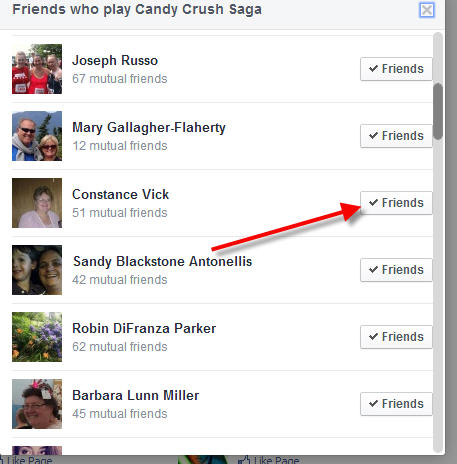
You should get a list something like the following:

games feed 2


Mouse over the “Friends” button. Then you should see a list of menu choices. I wasn’t able to get a screen shot, because my screen grab app can’t get a mouse over image. So you’re going need to follow along with the steps.

The are several menus and sub-menus on the Friends list. The first is “Get Notifications” after that you will see “Show in News Feed”. If “Show in News Feed” is checked, there should be a “Settings” item right underneath. Click on the “Settings” button. You then should see a list of items to be included in your “News Feed”

Unclick the “Games” item. Repeat the process on each FB friend listed in each game. This will eliminate most of the Game noise, but probably not all. It may take a while to get all of the game notifications. But sometimes you just have to do the unfriend thing. I try to judge the signal to noise ratio (or in some cases, the noise to signal ratio). You just have to judge if it is worth keeping a FB friend.

I hope you find this useful.

Joe

VPN Anyone?

August 19, 2013

You might say what the heck is a VPN? VPN stands for Virtual Private Network. VPN’s were originally developed to allow internet users access to the web from behind corporate firewalls. It was also used to allow home users access to corporate networks that were hidden by firewalls. Here is a much more detailed explanation of VPN’s on Wikipedia.

Okay, all well and good. Now VPN’s are used for several other purposes. Here’s a list. (by no means exhaustive).

  1. Security on public networks. If you use public internet access, say at your local Starbuck’s or local library, you are using a public internet. This means that other people with some clever tools can listen into what you are doing. The can see what sites you are visiting. They sometimes see the data you are transmitting. Using a VPN on public internet is a very good practice.
  2. Access to sites that are blocked. Some sites are blocked. Sometimes by governments (eg. China, Middle East), sometimes by corporations, and sometimes by ISP’s.

So there are private VPN’s operated by corporate IT departments and there are VPN’s that are public where you can purchase a license to use their service. I will be talking about the latter case, because that one is the most useful for the average user.

I first started thinking about VPN’s recently when CBS and Time Warner Cable (TWC) started a very public fight. The fight is over fees that CBS wants TWC to pay for the right to provide CBS to TWC’s customers. TWC customers could no longer watch CBS shows on their TV service. TWC also blocked access to CBS web sites on their internet service. I can’t do anything to fix the former problem (unless I buy an antenna or switch providers).  But I can do something about the internet service. I could of course switch TV and network providers, but that is a giant PITA.

The solution is to install a VPN on my laptop. There are several providers available. Most of the providers try a free “try before you buy” license, typically good for a few days. Currently, I am trying out “Avast Secure Line”, Seems to work. I can view the CBS sites. I need to try on MLBTV by attempting to watch games that are typically blacked out. It has free three day license. Then $42 for a year.

Here’s the screen shot of the Avast Secure Line:

avast secureline

iOS solution is a bit different. There are several iOS apps available. Search the App Store for “VPN”. Installation seems to be straight forward. The apps tend to be free. They typically limit initial free bandwidth to 300mb. So you get to try before you buy. After that you have to do in-app purchase to buy bandwidth. The privacy needs for my iPAD and iPhone are more important than my PC. I don’t take my laptop travelling very much. Most of the time it is plugged in to my home wifi. Here’s the link to the app store entry for “VPN Express“. There are other VPN apps. Try them and see what works.

2013-08-19 11.17.01

So my recommendation, get a VPN. Remember that freedom isn’t free, and neither is security. There is way too much snooping going on, Both by the government(s) and others. This is one additional way to keep people from snooping. Plus, now I can watch “David Letterman” and “Big Bang Theory”. VPN’s won’t prevent mail providers like Google or Yahoo giving the NSA the admin passwords to the mail servers. But it does plug an important hole in internet security.

I still need to try the VPN apps with MLBTV games that are blacked out for being local. For me that would be LA Dodgers and LA Angels. Not a real big deal. I only care about them when they’re playing the Boston Red Sox.

Costco Hearing Aids

June 19, 2013

Yesterday, we went for my appointment with the Costco Hearing Aid dept. We met with Vallonna who is the Hearing Aid Center manager. After filling out some forms and giving her my copy of my hearing test from Kaiser we got down to business.

We started with some more hearing tests. As usual, I sat in a sound proof room and listened to the head phones. Push the button when you hear the tone. In addition to what they did at Kaiser, she also did a loudness test. ie. How loud can we go before you feel pain? Push the button when it gets too loud.

She recommended a pair of Resound Forza 8 behind the ear BTE hearing aids. Base price of about $1350 each. Expensive but a lot less than the price at Hearx. She then programmed a pair of hearing aids for me to try. The hearing aids come with a handy remote control that can control both volume and program. She showed me how to use. Set it up with two programs, one for noisy and one for normal. Then she sent us off to wander around the store for 30 minutes.

This was something that the folks at Hearx never offered. Try before you buy, what a concept. The Costco warehouse was certainly a hearing challenging area. It took a little getting used to, but I liked them.

So we ordered the hearing aid pair. Paid with the Costco Amex card which gives 2% rebate at the end of the year. We also ordered the phone clip that provides the Blue Tooth capability. Pick up next Monday where Vallona will program. Then we have followup appointment the following Monday to see how things are going. I am looking forward to getting them.

TTFN

Joe

HearUSA/HEARx

June 12, 2013

Yesterday, I had my appointment with HearUSA in Torrance. It is a small store front that was easy to miss. There was a receptionist that had a several forms for me to fill out. Waited for about ten minutes to get to see the audiologist. (I think that’s the right term. Her card says she is “Doctor of Audiology”)

We got right down to business. She looked at my hearing test results and recommended a couple of behind the ear (BTE) models of hearing aids made by Siemens. The hearing aids are very small. Certainly smaller than I had envisioned. So I got to try one on. Hardly knew it was there. In fact, I would be afraid that it might fall off and get lost. That thought scares the hell out of me. ie. losing a device worth a couple of thousand dollars. Unfortunately, the demo units were just that demo units and didn’t actually work.

So here is a picture I took with my iPhone. It is really hard to get a feel from the picture how really small they are.

The audiologist was very pleasant. No hard sell. Just told me the prices. Both were in the range of $3600-$4600 for the pair. The price included the 20% discount for being a Kaiser member. Price included three year warranty and free batteries for three years. We were told that batteries last about a week with average usage. Package of 60 batteries runs about $25 on Amazon.com. I figure that package would last 6 months. So free battery offer is worth $300 over the three years. They also offer 12 month/0% financing. I suppose that eases the pain of forking over $5000 in one swipe of my Visa card.

The price didn’t include optional gadgets. Siemens sells a device that they call a “MiniTEK”. This is the device used to do Bluetooth and other various magic. Add $550, if you want Bluetooth. MiniTEK is device about the size of a garage door opener.

So here’s where we stand. Appointment with Costco next Tuesday. Then we get to decide. Told the woman at we’d get back to her once we decide. She didn’t try to persuade us to decide before we left. If it weren’t for the price, I would probably go with HEARx.

One more link. Here is the Facebook link.

Later…

Can you hear me now?

June 9, 2013

Over the past few months, it has become clear that I have been experiencing hearing loss. It kind of has been sneaking up on me. It started with fights over the TV remote volume control. I kept turning the volume up. Paula kept wanting it turned down.

I tried turning on closed captioning, but on broadcast TV the captioning lag the speech by about 3-5 seconds which is really annoying. Captioning on DVD’s tends to sync rather well with the spoken word.

I also was trouble understanding speech at lodge and chapter meetings. Bad audio system didn’t help.

Listening to a person speak in a crowded room with a lot of background noise has become impossible.

So I finally made an appointment at Kaiser for audio test. It seems that the hearing test is just about the only thing that is free. I quickly found out that hearing aids are very expensive. (we are talking about thousands of dollars).

So the test revealed normal hearing for low frequencies and moderate to severe hearing loss for higher frequencies (2Khz and above). This explains why I could hear men speak and not women.

So I have made appointments for hearing aids at a place called “HEARx” which is a subsidiary of HEARusa. (Partly owned by Kaiser). I also found out the Costco is in the hearing aid business and costs significantly less than all the rest. So appointment made with Costco.

Here’s an article that I found in the NY Times on the issue. Interesting stuff. Hearing aid technology has come a long way. Most hearing aids now support Bluetooth. So you can directly connect to iPhones and the like.

More later after I meet with Hearx and Costco


Five Months Gone

January 14, 2013

Okay, it’s been 5 months now that we’ve been in California. Time for an update. As you know, we are living with Paula’s mother in her three bedroom condo. So far so good. WW-III has not broken out yet. More on this later.

First thing that I’ve noticed is that everything out here seems to cost more. Here’s a few examples. I bought gasoline this morning. I paid $3.75 per gallon and I thought that was a pretty good price considering. Two months ago I saw one gas station charging $4.75. Food is expensive too. Large of Skippy Peanut Butter was $6.50 and I paid $4.00 back in MA. Movie prices seem to be competitive. Last movie we saw (Lincoln) was $5 for Senior ticket.

I always look forward to the times that we can go out without Mary K in tow. Tonight while Mary K is off to her historical society meeting (often called the hysterical society) we will be going to the movies. We’ll be seeing “Silver Linings Playbook”. We watched to Golden Globes last night. We have a lot of movies to see before the Oscars. Some were added to our Netflix queue, some still playing in theaters.

The weather has been pleasant. We are in a sort of rainy season for SoCal. We are very happy to have no snow. I seem to be always fighting MaryK on the thermostat. I try to leave it at 72. Given a chance she will push it up to 78. I came home from lodge last week and the condo felt like a sauna. She is always complaining about the cold. Matter of fact, all of the locals here complain about the cold weather (ie. 48). This past sunday, the parking lot at church was almost empty. 45 was a bit too cold for many folks to leave their homes. The weather for the last few days has been clear and cold (45). We can see the mountains to the east of LA quite clearly. Usually all we can see is the refineries in San Pedro.

I still feel like a foreigner here. To Paula she has come home. She seems to be always meeting someone that she went to high school at San Pedro HS. Just yesterday, we were at the grocery store. At the meat counter, the lady who was waiting on us, said “Don’t I know you?”. Turns out the lady and Paula went to high school together.

We usually go to church most sundays. We go to Ocean View Baptist Church. I didn’t really get a say in the choice of churches. This is the church that Mike & Theresa and Mary K go to. It was the same church that Paula went to back before she moved East to meet me thirty-five years ago. It’s a bit conservative for my choice. I really miss Rev Katherine and First Congo in Billerica. I haven’t dared to bring up the issue of accepting LGBT into the church. i would probably be expelled as a heretic. Sigh.

One of the daily challenges of living with Mary K is keeping track of her stuff. She is constantly losing her cell phone, her address book, or her keys. Things either fall into the black hole of her purse or get buried under the pile of paper at her seat on the couch. I am constantly trying to show her how to do things on her phone from listening to voice mail or using speed dial.

A while ago, I loaded her phone with speed dial entries for myself, Paula and Mike. Then I wrote the numbers on a piece of tape attached to the rear of the phone. Once we asked her why she didn’t call, she said I couldn’t find your phone number. I explained as simply as I could. Push the number corresponding to who you are trying to reach and hold for 5 seconds. So she pushes the number on the tape. Argggggh!

It’s a takes a constant effort to keep track of her calendar. We try to get her to write her dates on the calendar on the kitchen. She’s getting better at it but room for improvement. We try to get her to leave her important things (phone, keys, address book) in the same place.

Her short term memory is very bad. We will tell her something that is going on one day and need to repeat several days in a row until it settles in. Not a problem on her long term memory. If I had a nickel for every time she has told us the story of her days as a public health nurse in Palos Verdes, I would be rich.

We have hit the road running in Blue Lodge and OES. I play the piano on occasion for OES and Lodge. Right now I am the fill-in. Last Friday, I was scheduled to play at Alpha Star Chapter in Lomita. Meeting was to start at 7:30pm. I started playing to warm up at about 7:10. However, the heat wasn’t working so they moved the meeting to banquet hall which was closer to the kitchen. Easiest $25 I ever made. Still had fun. Lodge is one place where I can get some peace and quiet away from Mary.

Paula tries to go with her for her doctor’s appointments to make sure that all of the relevant information gets to the doctor. We haven’t managed to convince her she should have a primary care doctor. “Why do I need that?” she says. I’m not sick. Except some times she is sick. Intestinal issues, colds come on and get serious if not attended to.

One last thing. Paula and I are taking Mary K to see “Shen Yun 2013” at the Dorothy Chandler Pavillion in LA. Birthday present. so to speak. I’ll do a review after the event.

TTYL

Joe
– Posted using BlogPress from my iPad

Location:San Pedro

iOS V6 Tips and Tricks

December 31, 2012

Okay, you’ve got your shiny new iPhone or iPad and you’re trying to figure out all it can do. Right? Or maybe you’re thinking of upgrading to iOS v6.0. Here a few neat features and/or tricks.

First here’s a trick that showed up in iOS a while back. I don’t know when it first appeared. Maybe v5, I’m not sure. Sometimes it is useful to get a screen shot of your device. To do this, simultaneously push the start button and the power button. If you’ve done it correctly the screen should briefly flash solid white. Then bring up your pictures app. You should see the the screen shot image in the camera roll. Then you can copy to the clipboard or email the image. All of the screen shots in this post were generated using this method.

Do Not Disturb

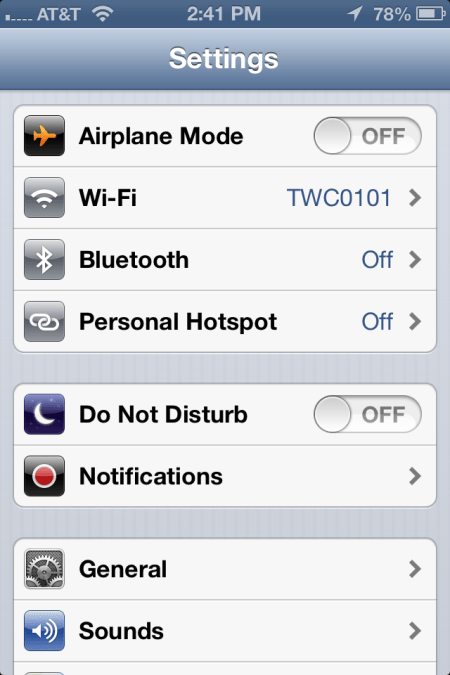
V6 added a “Do Not Disturb” feature. To turn on this feature, go to the “Settings” app. You should see something like the following:

2012-12-30 14.41.52

Swipe the switch on “Do Not Disturb” to on. Now your iPhone will only alert you for incoming text message, email, or phone calls from people on your “VIP List”.

To add someone to your VIP list, start your Contact App. Search for the person or company that you want to add.  Now suppose we wanted to add ‘Mickey Mouse” to out VIP list. Search for Mickey. You will see something like the following:

2012-12-30 15.19.55

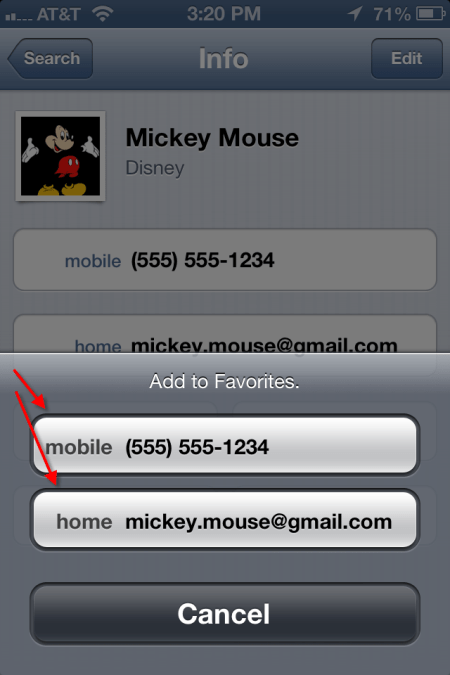
At the bottom of the screen, tap on the “Add to Favorites” button. You should then see a screen something like the following:

2012-12-30 15.20.46

Tap on each phone number or email address listed. When you add a phone number, it will ask you if it is for voice call or FaceTime. If there is only one address or phone number left to add, the iPhone will simply add it. Once completed, you will see little blue stars next to the phone or email address, like so.

2012-12-30 15.34.03

QR Codes

December 26, 2012

So what the heck is a QR Code? Maybe you’ve heard the term, maybe not. These days you see them everywhere. A QR code is that little square bar code thingy that one sees on advertising. Here’s an example:

qrcode.10492819

QR codes typically can be found in advertising, product labels and the like. Sometimes you might see them on the back of a business card. They can be used to store pointer to a web site (URL) or just plain text. QR codes on the back of business card usually contain contact information.

You can see QR codes just about anywhere. You see them in ads and on labels. I’ve seen them on billboards, though I don’t think bill board placement is particularly useful. How are you going to scan the code from a moving vehicle. You think that texting while driving is bad? Try reading QR codes while driving.

So how does one read and decipher a QR Code? First thing that you need is a smart phone. There are several apps for decoding QR codes, many of them free. The app uses your phone camera to scan the code and then decode it. The app that I use on my iPhone is called QRReader. There is a free version and a $.99 version. The free version has ads. You pay the $.99 to get rid of the ads. Fairly simple to use. Just start the app and line up your phone about 2-3″ from the add. As soon as the code is in focus the app beeps to let you know that it has been captured.

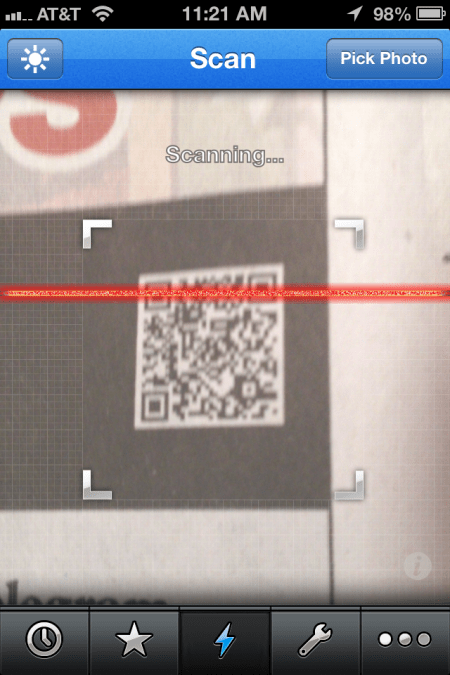
Here’s an image of the code being scanned:

2012-12-26 11.21.58

The app also has the capability to create a QR code. Also, there are a number of QR code generator web apps, most of them free. Here’s an web app that I’ve used at https://www.qrstuff.com You can either save your QR code as a JPEG file, email or print it.

There you have it. Now you can use QR codes to amaze and amuse your friends.