Archive for the ‘apps’ category

COIN

July 5, 2015

  About 18 months ago, I paid $50 to join a crowd source funding for a new product called “COIN”. COIN is supposed to be a credit card replacement that could dynamically change the data on the credit card magnetic stripe. One would be able to store a total of 8 different credit cards on the device. The idea is/was to reduce one’s credit card bloat in your wallet.

It seemed like a good idea to me. I typically have about 6-7 credit cards including ATM cards, credit cards and the like. The developer was promising delivery during the summer of 2014. I guess the early beta didn’t go as well as they hoped. So last summer they scheduled a second expanded beta with expanded beta units going to those who signed on early in the funding process.

Everyone else would have to wait until full production ramped up this summer. Those who didn’t want to wait could get a refund. So a couple of weeks ago I finally received my unit. Better late than never.

Here’s how it works, You need to install the COIN app on your smart phone (in my case an iPhone 6 plus). The COIN comes with a plug in credit card reader. First you have to pair your phone with the COIN. The COIN uses Blue-Tooth to communicate with the app.

One loads the credit cards into the app by swiping the card on the card reader. Then the app prompts you to add the security code on the back of the card. Once you are finished loading credit cards onto the app you then sync the credit cards with the COIN, So far so good. Works as advertised.

The COIN is the exact same size as a credit card. It has a small display that shows the card type (AMEX, Visa, etc) and last four digits of the card number. You can load credit/debit cards, gift cards and some id cards that have a magnetic stripe (though I can’t see how much use that would be.) There is button that you press to wake up the card and select the card that one wants to use.

Supposedly the COIN is compatible with most credit card readers and ATM’s. Here is where the rubber hits the road (or not). I haven’t tried it on any ATM’s yet. I don’t need to go to ATM’s very much. I usually get cash back while I am at the supermarket.

I have tried to use the device about a half dozen time. This is certainly a very limited sample size to be sure. I have attempted and been rejected at two different restaurants. I have successfully used it at a grocery store and the Starbucks at the grocery store.

It does have some neat security features though. The COIN won’t work if you lose connection to your phone. And the app will warn you that your COIN has gone away. It shuts off after about seven minutes and you will need a pass code to turn it back on or be paired with your phone.

So I wouldn’t use at it the regular Starbucks. They have an iPhone App for that and it works quite well.

Much of my shopping is done online and this device is of no use for that type of shopping.

My end goal is to have Apple-Pay become more widely accepted. Then I could ditch the credit cards all together. As it stands right now, I have only seen Apple-Pay in use at one merchant establishment (Panera Restaurant).

If you are interested in learning more about the device from the developer’s web site, Go to onlycoin.com. As for me, I’m not quite ready to leave my credit cards at home (at least not yet.) The support pages has a list of merchants that accept COIN and a list that have been reported as rejecting it.
Fake Music

April 4, 2015

pianoOnce upon a time, a friend was visiting me and we were talking about music. You see I play the piano and once in a while I play an organ. About a dozen years or so ago, I became our Lodge musician in my Masonic Lodge in Massachusetts. Now I am the musician for LA Harbor Lodge and San Pedro Chapter OES.

How does one become the organist or pianist for such an organization. First, you have to be able to play the piano. You don’t have to be an Rubenstein or Van Cliburn. You just have to like to play the piano or organ and competent enough to play some simple and straight forward tunes. Typically, I need to be able to play the “Star Spangled Banner” and other patriotic tunes, some bit of sacred music for opening and closing of the Bible and a variety of march music when the members are perambulating around the lodge room.

Second, the lodge or OES chapter has to have a need for a musician. I got the job because the guy who did it before me died. Sometimes the previous appointee had moved or lost interest in doing the job.

So my friend had seen some of my music books that I had at the time. One such tome was a book titles “Hymn Fake Book“. He asked me what a “Fake” Hymn was. I said no, not a fake hymn but hymn fake book. A fake book is a music book with the sheet music with only the music for your right hand. You have to improvise the accompaniment. So in addition to the hymn fake book there are fake books for Broadway, Show tunes, folk music, etc.

Lucky for me that I had learned this skill as a young lad from a music teacher that I worked with while I was in high school. He taught me how to play chords and to improvise an accompaniment. At the time, I didn’t think this skill would be particularly useful. Or that one day I would become a lodge organist.

So i have at least a dozen or so fake books covering a wide range of genres. They were a getting a bit heavy to carry to lodge for the evening’s meeting. I would eventually Xerox the particular music and add to my loose leaf notebooks. Even that began to get unwieldy.

Enter Apple. in 2010, Apple announced the iPad. I said to myself, I have to have one of these. So i drove up to the local Apple store in Nashua, NH and got an iPad 1. So I began the process of scanning my music pages and loading them on my Dropbox account in the Cloud. At first, it was a bit crude. I had files organized into folders according to genre, eg. hymns, patriotic, broadway, pop, etc.

People would look at the iPad and ask can you read music on that thing? In fact, I can and do. Although there is rumblings that Apple is working on a new iPad with a 12.5″ screen (current iPad has a 9″ screen, measured diagonally). I would buy one in a heartbeat if Apple came out with such a device.

As it stands right now, I am working on my third iPad. I had the iPad 1, then an iPad 3 and now an iPad Air.

My system of filing my music on Dropbox was getting cumbersome. So I got an app called “Forscore” that is designed for organizing sheet music. This app is absolutely worth the $9.99 I paid for it. I now have close to a 1000 different scores on my iPad. The music is organized by genre and keywords. New music is imported as PDF files from my Dropbox account.

I also buy music from Musicnotes.com which is a web site that sells sheet music. They have an extensive library of tunes from classical to pop to country. They also have a wide range of arrangements. I typically prefer to buy “Lead sheets” (which is the content of a fake book) because they are shorter and I don’t usually have to turn pages. Some of the arrangements come in multiple keys which is handy when you are working with a soloist.

When purchasing from Musicnotes, you download the music for printing. You get one chance to print it. But I have a printer driver that “Prints” to a PDF file that then can be uploaded onto my iPad. Musicnotes also has a free iPad app, but it is not nearly as capable as Forscore.
“”

Amazon Unlimited

July 25, 2014

So last week, Amazon announced a new product called “Amazon Unlimited” whereby for the monthly price of $9.95 one could down load Kindle books for free. If you read a lot (as I do), you might say “wow, pretty good deal”? Well, not so fast bucko. As always, the devil is in the details.

This announcement comes a couple of months after a similar product called “Oyster” appeared on the Internet. Same price, $9.95 a month, unlimited down loads.

One major difference between Oyster and Kindle Unlimited is that Oyster has it’s own app. Where Kindle Unlimited is integrated with existing Kindle apps and devices. So if you have a real Kindle, Oyster won’t work for you.

I tried Oyster for the four week trial period and then cancelled. The content was just not worth the money. No “A-List” or even “B-List” authors. There is no app for reading on PC or MAC.

So Kindle Unlimited works nicely with the existing Kindle devices and apps. No need to load an additional app.

So what about content. It’s a little tricky to find the titles that classified as “Kindle Unlimited”. Certainly, none of the A-List authors or books on the various best seller lists are available for Kindle Unlimited. Perhaps that might change, but I kind of doubt it.

So to look at it another way, if a book is selling north of $10, it is unlikely to appear on Kindle Unlimited. It’s seems that many of the books on Kindle Unlimited are by unknown authors. Here is search results for “Kindle Unlimited Books“. There seems to be a few bestsellers from years gone by. (eg. Life of Pi, or Water for Elephants). In looking at the list there is a lot of junk. Books that aren’t likely to sell for $3 or less.

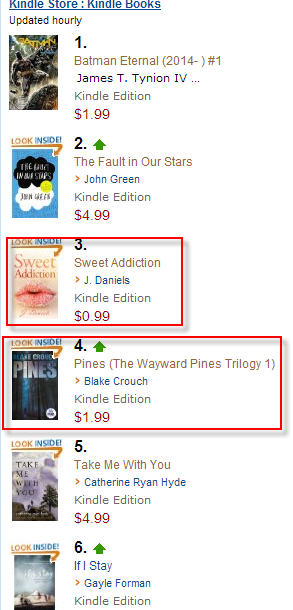
Some current best sellers are on Kindle Unlimited, but it’s tough to tell from the Best Seller screen. Here is a screen shot of the best seller list:

ku

Two books in the top six are on Kindle Unlimited. You can’t tell without clicking through to the book info. A clue is that the price is under $5.

It is not clear what publishers are participating in Kindle Unlimited. Perhaps more will get on board. My brother Richard Bowker (the author) has books on Kindle but his publisher is not doing Kindle Unlimited (yet). Okay, shameless plug: Go check out Richard’s books on Amazon. All good stuff. Most of his books are in the $3-$5 range.

So as time goes by, I expect that Amazon will sign up more publishers to participate in Amazon Unlimited. Time will tell. I am board for now.

– Posted using BlogPress from my iPad

Oyster

January 11, 2014

I found out about a new ebook service by the name of “Oyster“. It purports to be the “Netflix” of eBooks. Here’s the concept. For the price of $9.95 per month, you get access to an unlimited number of books to read. It starts with a 30 day free trial, then they bill your credit card $9.95 every month.

So what the heck, I thought I would give it a try. I signed up for the free trial. Of course you have to give them a credit card number to establish your account. So far so good.

The web site advertises apps for iPad, iPhone and iPod. No Android. So far so good. I don’t think you can read book from the PC web applet. You can browse and add books to your reading list. To read you need to go to your iPhone or iPad. Not a big problem but something to consider.

You can search for books or authors from the iPad or iPhone app. Sorry Richard Bowker, your books aren’t available.

So I browsed their collection. There certainly isn’t anything available from current books from any best-seller lists. Most of the material is at least a few years old if not more. They do have some classics available. I got several hits for “Charles Dickens” and “F Scott Fitzgerald”.

So the $64,000 question is. Is it worth it? For me, probably not.

Cons:

  • The books that I download, can’t be viewed on Paula’s Kindle.
  • You can’t read on a laptop.
  • You would have to read at least 3 or more books per month to compete with Amazon. I started reading a book from 2010 by Dennis Lehane that sells for $7.59 on Kindle. Charles Dickens books on Amazon are either free or $1 – $3.
  • Scrolling on the apps are up-down rather than left-right. Perhaps this is a nit. It’s just my personal preference for reading eBooks. No option to change.
  • No note taking or book-marking features.

Pros:

  • Actually I’m having trouble thinking of any. Perhaps if the price were a tad lower, like $4.50 per month.

So I will finish the book that I started (Dennis LeHane’s “A Drink Before the War”) then cancel.

Apps, Apps, Apps

January 2, 2014

I thought I would write about my favorite apps that I use on both my iPhone and iPad this past year. These are the apps that I use most every day. So in no particular order. The hyper links in each section will take you to the appropriate iTunes App Store location.
 
 Waze
 
 Waze is a GPS app for iPhone and iPad. Though I use it primarily with my iPhone. Waze uses the internet to provide real-time traffic updates. The only major drawback is that it needs a network connection to provide routing information. This happened to us last fall up in Kern County, CA which is in the middle of nowhere. The app is free that is to say it is supported by ads. When you pull up to a traffic light, it will let you know where a nearby business is.
 
 Evernote
 
 Evernote is more than just a note taking app. It is an total environment. The app itself is free, however you can get Evernote Pro for $5 per month or $45 per year that provides additional features like syncing with the cloud.
 
 There are Evernote apps for iPhone, iPad, PC, and Mac. So with syncing to the cloud you can seemlessly move a note from iPhone to PC, for example.
 
 There are many companion apps that integrate with Evernote. Recipe app called “Food” for managing recipes and restaurants. Sketch for doing drawings. There is a journaling app for keeping a daily journal.
 
 You can create multiple notebooks. You can create tags for easy search and retrieval. There is also a handy email connection that allows one to forward an email to your Evernote account on the network. There is an web clipping for all of the major web browsers.
 
 Crosswords
 
 Where would I be without access to crosswords. There are several crossword apps available, but my favorite is Crosswords by Standalone, Inc. It provides many free subscriptions to quality crossword providers. You can also get subscriptions (for a fee) to NY Times. Difficulty levels range from easy to very difficult.
 
 Dropbox
 
 Dropbox is cloud storage. I use it to store all of important files that I don’t want to lose. I use it for storing pictures, insurance files, financial documents, and sheet music files and much much more. Files get automatically stored in the cloud including pictures taken with your iCamera. If I recall correctly you get either 5 or 10 Gb for free. I get 100 Gb for $10 per month. There are dropbox apps for iPhone, iPad, PC, Mac and Android.
 
 ForScore
 
 ForScore is my music score management app. When I got my first iPad, I just used a PDF app for keeping my sheet music PDF files. I then discovered “Forscore”. I upload each PDF file from Dropbox. Then I add composer info, tags, genre (eg. pop, country, classical, etc.), key signature.
 
 I can create set lists for songs that I typically play during various parts of lodge meetings.
 
 ForScore is only available on iPad. Sorry Android fans.
 
 GroceryIQ
 
 GroceryIQ is a shopping list app. It’s free, which is to say that it is ad supported. It is available for iPhone, iPad, PC, Mac and Android. It allows you to sync shopping lists between devices. You can scan barcodes in order to add items to your list. Only downside is you can’t scan is store brands.
 
 You can customize the app for each store’s aisles so that items appear in the proper order that you might find them in each store. It’s real handy to add items to the PC app and then have them available on the iPhone version.
 
 My only complaint is that when you add items for one store, and then go to a different store it is difficult to changer all of the items to the different store.
 
 PWsafe
 
 PWsafe is an encrypted Pass Word Safe. Today it is very difficult to remember all of one’s passwords to a multitude of web sites. This app makes it easy and secure. You can secure with a password safe database on Dropbox. All you need to remember is the password to the Password safe. I must have usernames and passwords for over one hundred different sites. None of the passwords are the same. Apps for iPad, iPhone, PC and MAC. App is free, except for feature to sync with Dropbox.
 
 BlogPress
 
 BlogPress is the app that use to write my blog posts. This post was written using BlogPress. It connects to my account on WordPress. It works for me. Drafts can be stored online and later edited on the PC App.
 
 That’s about it for now. Maybe later I’ll do a post on apps that I despise. But for now this is my list of favorite apps.
 
 TTFN,
 
 Joe


 – Posted using BlogPress from my iPad

VPN’s Explained

September 13, 2013

Last night I mentioned the use of a VPN on Facebook. It occurred to me that many of my FB friends don’t have a clue what I was talking about. So here is a brief tutorial on VPN’s.

VPN stands for Virtual Private Network. It was originally developed to allow remote users to securely connect to a corporations internal networks. Corporations install firewalls to prevent unauthorized users to snoop around their internal networks. The VPN provides end-to-end encrypted connection.

That was the original idea. Now it seems some new and clever uses have emerged. There are companies that will sell for a modest price VPN service that provides anonymous connections to the internet. This has been used successfully in third world countries to allow users (say in China) to bypass Chinese government attempts to prevent Chinese citizens to look at sites outside their country.

The service that I use is sold by a company called Avast!. They also provide free anti-virus apps. So when I bring up my VPN it goes through one of Avast’s servers around the world. This prevents snoops (like the NSA or CIA) from looking at what web sites you are visiting.

Web servers have the ability to find out in a general fashion where you are located. For instance, a weather site would find out that I live in the Los Angeles area and that I probably would be interested in the weather in LA. A site can do a “traceroute” to find out where your IP address is located. Netflix uses traceroute to make sure that you are inside the continental USA. Their agreement with content providers is for US access only.

So when I use a VPN, I can make a web server think that I am located somewhere else. Last night I was trying to access both the Apple and AT&T site. My thought was that they might be giving east coast users a head start on ordering new iPhones. So I loaded my VPN going through New York. It didn’t help because the Apple and AT&T sites were severely overloaded.

I also occasionally use it for accessing MLBtv. That is the Major League Baseball subscription app for viewing baseball games. MLB however blacks out games in your local area. Seeing as I usually want to watch Boston Red Sox game, this is not a problem. However, when the Sox were playing the LA Dodgers, the game was blacked out here in LA. So I loaded my VPN going through Seattle. Presto, MLB thinks I’m in Seattle. Game on. Unfortunately this doesn’t work for my iPad. Apple devices also have a GPS that MLB uses to find out where you are.

VPN’s are also very useful for securing your internet access from public wiFi access (eg. at Starbucks, Local Libraries and hotels). I strongly encourage VPN use in those situations. You just don’t know who is listening.

Here are a few links for your education (be forwarned these wiki articles are a bit technical):

Virtual Private Networks Wiki

Traceroute

Avast! VPN Service

iPhone 5S vs Samsung Galaxy Note 3

September 11, 2013

I am getting the urge to upgrade my cell phone. For the past two years I have had an iPhone 4S. This was my second iPhone. The first being a 3GS model.

So Apple has announced their new iPhone models yesterday. New top of the line 5S and a 5C (the C doesn’t stand for cheap, btw,) Apple didn’t say what the “C” stood for but I think it stands for “Color”. Anyhow, it doesn’t matter much.

Samsung has also announced some new products. The one that I am particularly interested in is the “Galaxy Note 3″. This is what folks are calling a PHablet. ie. a mix of tablet and phone. It has a 5.7″ screen compared to the iPhone 5S’s 4”. It would be a bit large to fit in my shirt pocket. So here are a couple of pictures.

The iPhone 5S at its launch in California on Tuesday

Samsung Galaxy Note III preview

Price for both devices is similar. The 32GB iPhone 5S is $299 and the Galaxy Note 3 is $299. There has been tons of stuff written about both devices. So my question for everyone is which would you choose and why?

Here’s some of my thoughts.

Staying with Apple would make the upgrade real easy. Just back up the 4S and download onto the 5S. All of the apps that I have purchased would work with the new phone. Data compatibility with my iPad.

But screen size is a big one. If I got the note 3, there would be less occasions that I would need to bring my iPad. The Note 3 has a replaceable battery which is cool.

So what do you all think?

How to disable Game Notification on Facebook

August 20, 2013

A couple of days ago, i posted on Facebook about the annoyance of getting game notifications. I like FB. It allows me to keep up with news from my friends around the country that i would not be able to do otherwise.

But the constant game notifications is just plain annoying. I am happy that my many friends enjoy FB games. But as I stated before, I could care less about your latest exploits on Farmville or Candy Crush Saga.

I don’t think that you can disable all of the notifications, but you can get rid of them. Here’s how.

Open FB on your PC.  Click the “Games Feed” button on the left hand side of the page. You should see something like the following:

games feed


Then click the “friends” button under one of the games. It doesn’t matter which game. And you may have to do this more than once. This will give you a list of your FB friends who have played that particular game.

games feed 1


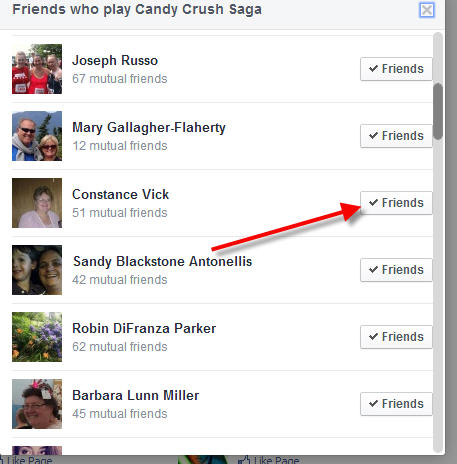
You should get a list something like the following:

games feed 2


Mouse over the “Friends” button. Then you should see a list of menu choices. I wasn’t able to get a screen shot, because my screen grab app can’t get a mouse over image. So you’re going need to follow along with the steps.

The are several menus and sub-menus on the Friends list. The first is “Get Notifications” after that you will see “Show in News Feed”. If “Show in News Feed” is checked, there should be a “Settings” item right underneath. Click on the “Settings” button. You then should see a list of items to be included in your “News Feed”

Unclick the “Games” item. Repeat the process on each FB friend listed in each game. This will eliminate most of the Game noise, but probably not all. It may take a while to get all of the game notifications. But sometimes you just have to do the unfriend thing. I try to judge the signal to noise ratio (or in some cases, the noise to signal ratio). You just have to judge if it is worth keeping a FB friend.

I hope you find this useful.

Joe

VPN Anyone?

August 19, 2013

You might say what the heck is a VPN? VPN stands for Virtual Private Network. VPN’s were originally developed to allow internet users access to the web from behind corporate firewalls. It was also used to allow home users access to corporate networks that were hidden by firewalls. Here is a much more detailed explanation of VPN’s on Wikipedia.

Okay, all well and good. Now VPN’s are used for several other purposes. Here’s a list. (by no means exhaustive).

  1. Security on public networks. If you use public internet access, say at your local Starbuck’s or local library, you are using a public internet. This means that other people with some clever tools can listen into what you are doing. The can see what sites you are visiting. They sometimes see the data you are transmitting. Using a VPN on public internet is a very good practice.
  2. Access to sites that are blocked. Some sites are blocked. Sometimes by governments (eg. China, Middle East), sometimes by corporations, and sometimes by ISP’s.

So there are private VPN’s operated by corporate IT departments and there are VPN’s that are public where you can purchase a license to use their service. I will be talking about the latter case, because that one is the most useful for the average user.

I first started thinking about VPN’s recently when CBS and Time Warner Cable (TWC) started a very public fight. The fight is over fees that CBS wants TWC to pay for the right to provide CBS to TWC’s customers. TWC customers could no longer watch CBS shows on their TV service. TWC also blocked access to CBS web sites on their internet service. I can’t do anything to fix the former problem (unless I buy an antenna or switch providers).  But I can do something about the internet service. I could of course switch TV and network providers, but that is a giant PITA.

The solution is to install a VPN on my laptop. There are several providers available. Most of the providers try a free “try before you buy” license, typically good for a few days. Currently, I am trying out “Avast Secure Line”, Seems to work. I can view the CBS sites. I need to try on MLBTV by attempting to watch games that are typically blacked out. It has free three day license. Then $42 for a year.

Here’s the screen shot of the Avast Secure Line:

avast secureline

iOS solution is a bit different. There are several iOS apps available. Search the App Store for “VPN”. Installation seems to be straight forward. The apps tend to be free. They typically limit initial free bandwidth to 300mb. So you get to try before you buy. After that you have to do in-app purchase to buy bandwidth. The privacy needs for my iPAD and iPhone are more important than my PC. I don’t take my laptop travelling very much. Most of the time it is plugged in to my home wifi. Here’s the link to the app store entry for “VPN Express“. There are other VPN apps. Try them and see what works.

2013-08-19 11.17.01

So my recommendation, get a VPN. Remember that freedom isn’t free, and neither is security. There is way too much snooping going on, Both by the government(s) and others. This is one additional way to keep people from snooping. Plus, now I can watch “David Letterman” and “Big Bang Theory”. VPN’s won’t prevent mail providers like Google or Yahoo giving the NSA the admin passwords to the mail servers. But it does plug an important hole in internet security.

I still need to try the VPN apps with MLBTV games that are blacked out for being local. For me that would be LA Dodgers and LA Angels. Not a real big deal. I only care about them when they’re playing the Boston Red Sox.

Crossword Puzzles

July 15, 2013

So you think you might want to try your hand at doing crossword puzzles? Seem overwhelming?  I have been doing crossword puzzles for many years now. Here’s my handy dandy guide to doing crossword puzzles.

  1. Start on Monday. Many crossword puzzle providers start easy on Monday and then work up in difficulty as the week goes on. I usually can do the NY Times Monday puzzle in about 5 minutes. The Saturday puzzle usually takes me 30 minutes or longer. Sunday puzzles generally take me around 45 minutes or so.
  2. Use a pencil with an eraser if you use the printed puzzles. Don’t be afraid to enter a clue. Try it and see if it agrees with the corresponding across or down clues.
  3. If you like to solve online, use the program “AcrossLite”. It’s available for Windows and Mac. There are also several apps for smart phones and tablets. I use an app from Standalone Software on my iPad.
  4. Daily puzzles are (in the U.S.) a 15×15 grid. Sunday puzzles are a 21×21 grid. The grid is (almost always) symmetrical along the SW to NE axis.
  5. Puzzles with a large amounts of open space are always harder.
  6. Here is a link to some good tips on crossword clues.

Finally, here are a few articles or books on word puzzles worth looking at:

  1. Article about Will Shortz (NY Times puzzle editor)
  2. Book by Eugene Maleska called “Pleasure in Words” [no longer in print] You’ll either have to buy used or go to the public library. Maleska is the former NY Times puzzle editor.