For your listening enjoyment.
Stuff you can’t get in California
Posted January 19, 2013 by joebowkerCategories: Uncategorized
I’m enjoying my life in California, don’t get me wrong. But there are some things that are not to be found.
Here’s my current list.
1. Cape Cod potato chips. There are some decent substitutes of “kettle cooked” chips. I believe that one can buy them online. I believe that the minimum order is six bags. Of course, shipping not included.
2. Pepperidge Farms Bread. One of my favorite breads is PF’s deli swirl rye. It’s a swirl combination of dark and light ryes. No substitute found out here yet.
3. Dunkin Donuts. One can buy ground DD coffee in the grocery store (but not decaf) and no DD restaurants. Closest substitute is Starbuck’s. I just read today that DD is expanding into SoCal again. WooHoo! STarbucks doesn’t have decaf. One of the local grocery stores has a Starbuck’s in the store and the grocery carts have a place for your cup. Cool.
4. Drive-up windows. Well they do have drive thru’s for MacDonalds, In’n’Out, etc. But not for Starbucks or any other coffee shop. You’d think that in LA where the car is king there’d be a drive thru window for coffee. Go figure.
Here are things that associate with New England that one can get in LA.
Ben & Jerry’s Ice Cream
Sam Adams Beer
One more thing. We are looking for a place to buy baclava. Anyone know of a Greek bakery in the San Pedro area?
Later…
Five Months Gone
Posted January 14, 2013 by joebowkerCategories: California, Food, Religion, Technology
Tags: California, food, reviews
Okay, it’s been 5 months now that we’ve been in California. Time for an update. As you know, we are living with Paula’s mother in her three bedroom condo. So far so good. WW-III has not broken out yet. More on this later.
First thing that I’ve noticed is that everything out here seems to cost more. Here’s a few examples. I bought gasoline this morning. I paid $3.75 per gallon and I thought that was a pretty good price considering. Two months ago I saw one gas station charging $4.75. Food is expensive too. Large of Skippy Peanut Butter was $6.50 and I paid $4.00 back in MA. Movie prices seem to be competitive. Last movie we saw (Lincoln) was $5 for Senior ticket.
I always look forward to the times that we can go out without Mary K in tow. Tonight while Mary K is off to her historical society meeting (often called the hysterical society) we will be going to the movies. We’ll be seeing “Silver Linings Playbook”. We watched to Golden Globes last night. We have a lot of movies to see before the Oscars. Some were added to our Netflix queue, some still playing in theaters.
The weather has been pleasant. We are in a sort of rainy season for SoCal. We are very happy to have no snow. I seem to be always fighting MaryK on the thermostat. I try to leave it at 72. Given a chance she will push it up to 78. I came home from lodge last week and the condo felt like a sauna. She is always complaining about the cold. Matter of fact, all of the locals here complain about the cold weather (ie. 48). This past sunday, the parking lot at church was almost empty. 45 was a bit too cold for many folks to leave their homes. The weather for the last few days has been clear and cold (45). We can see the mountains to the east of LA quite clearly. Usually all we can see is the refineries in San Pedro.
I still feel like a foreigner here. To Paula she has come home. She seems to be always meeting someone that she went to high school at San Pedro HS. Just yesterday, we were at the grocery store. At the meat counter, the lady who was waiting on us, said “Don’t I know you?”. Turns out the lady and Paula went to high school together.
We usually go to church most sundays. We go to Ocean View Baptist Church. I didn’t really get a say in the choice of churches. This is the church that Mike & Theresa and Mary K go to. It was the same church that Paula went to back before she moved East to meet me thirty-five years ago. It’s a bit conservative for my choice. I really miss Rev Katherine and First Congo in Billerica. I haven’t dared to bring up the issue of accepting LGBT into the church. i would probably be expelled as a heretic. Sigh.
One of the daily challenges of living with Mary K is keeping track of her stuff. She is constantly losing her cell phone, her address book, or her keys. Things either fall into the black hole of her purse or get buried under the pile of paper at her seat on the couch. I am constantly trying to show her how to do things on her phone from listening to voice mail or using speed dial.
A while ago, I loaded her phone with speed dial entries for myself, Paula and Mike. Then I wrote the numbers on a piece of tape attached to the rear of the phone. Once we asked her why she didn’t call, she said I couldn’t find your phone number. I explained as simply as I could. Push the number corresponding to who you are trying to reach and hold for 5 seconds. So she pushes the number on the tape. Argggggh!
It’s a takes a constant effort to keep track of her calendar. We try to get her to write her dates on the calendar on the kitchen. She’s getting better at it but room for improvement. We try to get her to leave her important things (phone, keys, address book) in the same place.
Her short term memory is very bad. We will tell her something that is going on one day and need to repeat several days in a row until it settles in. Not a problem on her long term memory. If I had a nickel for every time she has told us the story of her days as a public health nurse in Palos Verdes, I would be rich.
We have hit the road running in Blue Lodge and OES. I play the piano on occasion for OES and Lodge. Right now I am the fill-in. Last Friday, I was scheduled to play at Alpha Star Chapter in Lomita. Meeting was to start at 7:30pm. I started playing to warm up at about 7:10. However, the heat wasn’t working so they moved the meeting to banquet hall which was closer to the kitchen. Easiest $25 I ever made. Still had fun. Lodge is one place where I can get some peace and quiet away from Mary.
Paula tries to go with her for her doctor’s appointments to make sure that all of the relevant information gets to the doctor. We haven’t managed to convince her she should have a primary care doctor. “Why do I need that?” she says. I’m not sick. Except some times she is sick. Intestinal issues, colds come on and get serious if not attended to.
One last thing. Paula and I are taking Mary K to see “Shen Yun 2013” at the Dorothy Chandler Pavillion in LA. Birthday present. so to speak. I’ll do a review after the event.
TTYL
Joe
– Posted using BlogPress from my iPad
Location:San Pedro
Addendum to Do Not Disturb
Posted January 1, 2013 by joebowkerCategories: apps, iPad, iPhone
Tags: Apps, iPhone
Happy New Year.
One more thing related to “Do Not Disturb”. You can automate the Do Not Disturb function. (Pointed out to me by one of my faithful blog readers.)
Go to the “Settings” App again.

Tap the “Notifications” button.

Then, tap the “Do Not Disturb” Button.
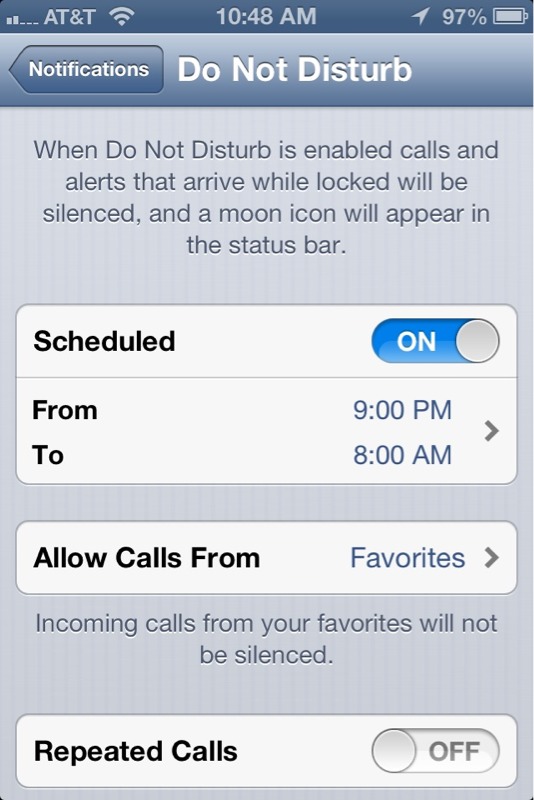
Swipe the “Scheduled” switch to “On”.
Then adjust the “From” time and “To” times to the times that you don’t want to receive calls.
There that was easy.
– Posted using BlogPress from my iPad
Location:San Pedro, CA
Annual Report for Calherewecome
Posted December 31, 2012 by joebowkerCategories: Uncategorized
I started this Blog back in May. I’ve done 104 posts with most of them happening over the summer.
For the complete report, see https://calherewecome.com/2012/annual-report/
Jor
iOS V6 Tips and Tricks
Posted December 31, 2012 by joebowkerCategories: apps, iPad, iPhone, Technology
Tags: Apps, iPad, iPhone, vip-list
Okay, you’ve got your shiny new iPhone or iPad and you’re trying to figure out all it can do. Right? Or maybe you’re thinking of upgrading to iOS v6.0. Here a few neat features and/or tricks.
First here’s a trick that showed up in iOS a while back. I don’t know when it first appeared. Maybe v5, I’m not sure. Sometimes it is useful to get a screen shot of your device. To do this, simultaneously push the start button and the power button. If you’ve done it correctly the screen should briefly flash solid white. Then bring up your pictures app. You should see the the screen shot image in the camera roll. Then you can copy to the clipboard or email the image. All of the screen shots in this post were generated using this method.
Do Not Disturb
V6 added a “Do Not Disturb” feature. To turn on this feature, go to the “Settings” app. You should see something like the following:
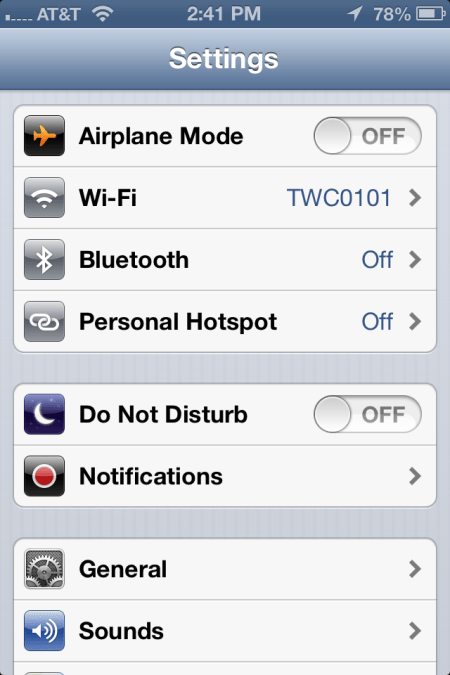
Swipe the switch on “Do Not Disturb” to on. Now your iPhone will only alert you for incoming text message, email, or phone calls from people on your “VIP List”.
To add someone to your VIP list, start your Contact App. Search for the person or company that you want to add. Now suppose we wanted to add ‘Mickey Mouse” to out VIP list. Search for Mickey. You will see something like the following:

At the bottom of the screen, tap on the “Add to Favorites” button. You should then see a screen something like the following:
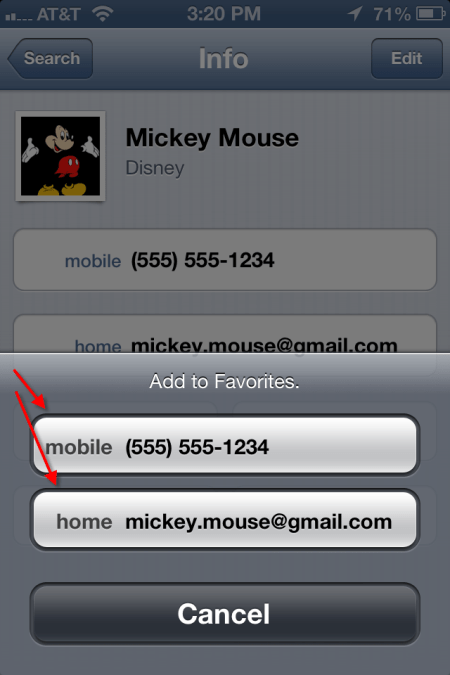
Tap on each phone number or email address listed. When you add a phone number, it will ask you if it is for voice call or FaceTime. If there is only one address or phone number left to add, the iPhone will simply add it. Once completed, you will see little blue stars next to the phone or email address, like so.

QR Codes
Posted December 26, 2012 by joebowkerCategories: apps, iPad, iPhone, Technology
Tags: Apps, iPhones, QR Codes
So what the heck is a QR Code? Maybe you’ve heard the term, maybe not. These days you see them everywhere. A QR code is that little square bar code thingy that one sees on advertising. Here’s an example:
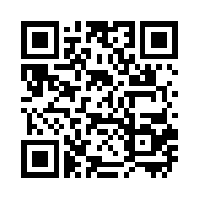
QR codes typically can be found in advertising, product labels and the like. Sometimes you might see them on the back of a business card. They can be used to store pointer to a web site (URL) or just plain text. QR codes on the back of business card usually contain contact information.
You can see QR codes just about anywhere. You see them in ads and on labels. I’ve seen them on billboards, though I don’t think bill board placement is particularly useful. How are you going to scan the code from a moving vehicle. You think that texting while driving is bad? Try reading QR codes while driving.
So how does one read and decipher a QR Code? First thing that you need is a smart phone. There are several apps for decoding QR codes, many of them free. The app uses your phone camera to scan the code and then decode it. The app that I use on my iPhone is called QRReader. There is a free version and a $.99 version. The free version has ads. You pay the $.99 to get rid of the ads. Fairly simple to use. Just start the app and line up your phone about 2-3″ from the add. As soon as the code is in focus the app beeps to let you know that it has been captured.
Here’s an image of the code being scanned:
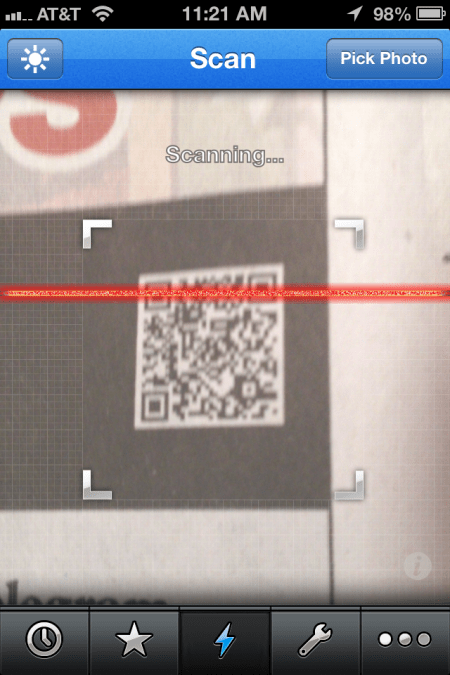
The app also has the capability to create a QR code. Also, there are a number of QR code generator web apps, most of them free. Here’s an web app that I’ve used at https://www.qrstuff.com You can either save your QR code as a JPEG file, email or print it.
There you have it. Now you can use QR codes to amaze and amuse your friends.
More Apps
Posted December 26, 2012 by joebowkerCategories: apps, games, iPad, iPhone, Technology
Time to talk about some more iPhone and iPad apps. These are apps that I tend to use a lot and in no particular order. I will try to include a pointer to the app on the iTunes store and/or developer web site,
Genius Scan
Genius Scan utilizes the rear facing camera as a scanner. This is primarily an iPhone app, but it runs on any iPad with a rear facing camera. The app takes a picture using the camera, then it allows you to de-skew the image so that it is square. Here’s a couple of screen shots to explain what I mean.
Once you save the image as either color, b/w or greyscale, you can title, add tags, etc. Then you can either save to dropbox or email the document. There is a basic version (free) and a plus version ($2.99).
Waze
Waze is a GPS Mapping app. What makes Waze different from other mapping apps is that it free. Waze uses the network connection to update the Waze servers with information about traffic, road obstructions and police presence. It will suggests alternate routes when traffic is bogged down on your priority route. You can report accidents, slow downs and speed traps. You can optionally have those reports appear on Twitter and/or Facebook.
To use this app safely in a car, you will need to get some sort of windshield mount and a 12v power connector. You can find this stuff online at Amazon and other online etailers.
Here’s the iTunes link
Now for fun stuff. Let’s talk about games. Here are few of the games that I use to amuse myself when I’m bored and tired of reading.
Crosswords
Okay, I admit it. I’m a crossword puzzle junkie. The crossword puzzle app is called “Crosswords“. The Crosswords app automatically downloads passwords every day. You can choose which puzzles to download. If you have a subscription to crossword puzzle providers (like the NY Times puzzle) you can enter the username and password to download those puzzles.
You can also sync puzzles between IOS devices. You can start a puzzle on your iPad and finish it on your iPhone.
Word Warp
Word Warp is a word jumble game. Each round you are given six letters that you must unscramble into words. If you get any of the six letter words, you get to continue to the next round. Simple but amusing. Each round lasts 2 minutes. There is a free version with ads and a paid version without ads.
That’s enough for now. More post to come on apps.
Joe

There’s an App for that
Posted December 17, 2012 by joebowkerCategories: Music, Reviews, Technology
Tags: Apps, IOS, iPad, iPhone, reviews, tech, technology
First, some administrivia. This is my 100th post. How’d that happen?
I thought I would write about some of my favorite iPhone/iPad apps. As many of you know (or may not) I own a 3rd gen iPad and in iPhone 4s. Here in no particular are some of the apps that I use a lot. Note, most of the hyperlinks takes you to the iTunes store.
Shazam is in app for identifying music. Push the button and the app will listen for about 30-60 seconds and report to you what you are listening. It is truly amazing. Even works with classical music. BTW, it’s free.
An app for managing grocery lists. Sync’s with your grocery list in the cloud. So you can add something on the iPad list and it shows up your iPhone list. There is also a web version. Free. There is also an Android version.
Dropbox is a cloud file storage service. I pay $10 a month for 100Gb of storage. There are Dropbox apps for iPhone, iPad, Android, etc. You selectively sync folders on to your device.
Sheet Music Apps
When the iPad first came out, I decided it would be an excellent platform for storing my collection of sheet music. I had hundreds of pages of sheet music stored in loose leaf binders. This was a killer app for me.
At first I used Readledocs together with dropbox to put my sheet music (stored as PDF files on Dropbox) on to my iPad. I also used a similar app called PDF Expert. I believe that both apps support Google drive (another cloud storage service). Both apps support annotation of the files. Readdledocs is $4.99 and PDF Expert is $9.99.
Forscore is a sheet music management app. One loads music scores in PDF format into the app. Then one can assign to a genre (eg. Classical, Pop, etc.)
But there’s more. You can create ‘Set Lists’ then organize according to the way you plan to play the music. You can import from Dropbox and other cloud storage services. Then add other meta-data related to each score (author, tags, etc.)
They also sell music scores. Price $4.99. Well worth the money.
Musicnotes is another sheet music app. The difference here is that it is primarily for viewing scores bought from their service on musicnotes.com. The app is free, but you have to buy music from them.
They have an option for loading PDF files that you have created. But this costs $9.99 and doesn’t work very well. I either scan the music on my flat bed scanner or use an app called DeskPDF to create the PDF file. For my money, Forscore is way better.
PWsafe is an app for managing usernames and passwords. The app is free, but for a couple of dollars you can add the function to sync password files on Dropbox or other cloud file services. In my online world I have many accounts on many different services. (eg. Banking, Shopping, Social media, Subscriptions, etc.). Using the same password on all of one’s accounts is a bad idea. So remembering multiple passwords is (at least to me) impossible. PWsafe encrypts the file that stores your passwords. Now you only need one master password to open the file. IOS devices and Android supported as well as Windows PC.
That’s enough for now. More later…
 calherewecome